

What this integration enables
Once connected, Siro syncs the following data from your Dealertrack DMS in near real-time:- Deal records – VIN, stock number, sale date, deal type, and sale status, used to link recordings to F&I deals
- Repair orders – RO number, advisor, labor and parts totals, used to link service advisor recordings to open or closed ROs
- Service appointments – scheduled time, advisor, VIN, and reason for visit, used to surface appointment reminders ahead of a visit
- Customer records – name, phone, and email for customer context on recordings
- Employee records – used to automatically match Dealertrack employees to their Siro user accounts
Quick checklist
Before you start, make sure you have:- Access to your Dealertrack DMS – your user account must have Opentrack access enabled. If you are unsure, contact your DMS administrator before starting.
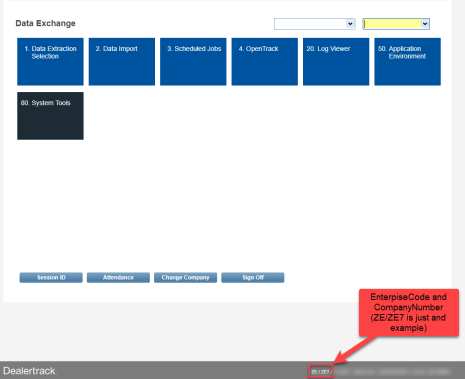
- Your DMS Enterprise Code and Company Code – find these in the bottom right-hand corner of your DMS screen. Your CSM will need these to complete the setup on their end.
Steps
1. Open OpentrackIn the top menu of your Dealertrack DMS, click More, then Data Exchange, and select Opentrack. This opens the Active Methods list screen. 2. Create a new vendor
From the Active Methods list, click Add to start a new entry. The Vendor Access definition screen will open – you will choose the Method, select Siro as the Vendor, and set the access dates in the next step. 3. Define the vendor settings
- Method – Click the Method hyperlink. Select each of the available methods individually, then click Ok:
- Customers
- Deals
- Service
- Vendor – Click the Vendor hyperlink. Select Siro from the Certified Vendors list, then click Ok.
- Access begins – Click the calendar and select today’s date, or the date you would like Siro’s access to begin.
- Access ends – Leave this field blank unless your CSM has told you otherwise.
What happens next
Your Siro CSM will configure the integration on Siro’s end once they have your Enterprise Code and Company Code. They will confirm with you once data is flowing.Multiple locations? Each dealership rooftop requires its own separate vendor authorization in Dealertrack Opentrack. If you have multiple locations, repeat the steps above for each one and share the Enterprise Code and Company Code for each location with your CSM.